
Cut daily screen time without deleting apps : 9 accessories that add healthy friction and work in real life. Data-backed tips, zero fluff.
Screen time crept up quietly, then stayed. Global internet users now spend close to a full workday online each day across devices, with social media alone taking hours. The goal is not a digital detox fantasy. It is small, sustainable cuts that stick.
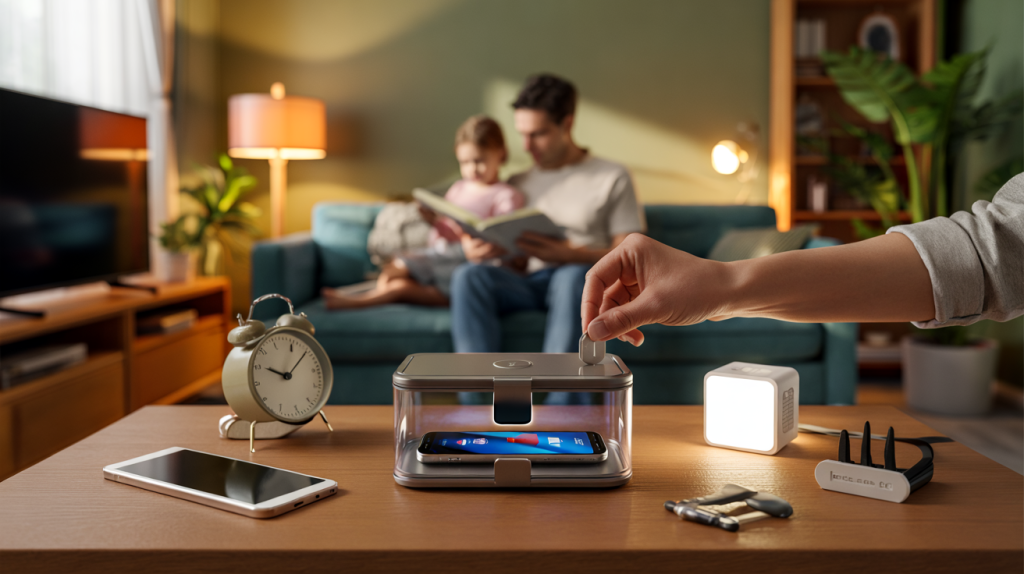
Accessories help because they change the environment, not willpower. Think lockable phone boxes for the evening, a basic alarm clock in the bedroom, an e-ink reader that steals attention back from the phone. These tools remove taps and pings at the precise moments we cave.
Screen time reality : the problem to solve, not to fear
According to DataReportal’s Digital 2024, people spend around 6 h 40 min online daily, with social media averaging about 2 h 23 min worldwide in January 2024 source. Families feel it. The World Health Organization advised in 2019 that children aged 2 to 4 should have no more than 1 hour of sedentary screen time per day, with less being better source. The American Academy of Pediatrics suggests a family media plan with consistent limits rather than a one-size rule for older kids and teens source.
Adults are not immune. A classic 2017 study found the mere presence of a smartphone reduces available cognitive capacity, even when the device is silent and face down source. That is exactly why physical accessories – the ones that move the phone out of reach or sight – work better than another app nag.
The best accessories to reduce screen time : simple gear, big impact
Different lives need different tools. Pick the one that tackles your biggest leakage moment – late-night doomscrolling, endless reels while cooking, homework distractions, weekend gaming spirals.
- Lockable phone box with a timer : place the phone away for dinner or 8 pm to 7 am. The friction does the heavy lifting.
- Mechanical alarm clock : charge the phone outside the bedroom to protect sleep and mornings.
- Router-level control hub (for example, Circle or a parental-control router) : schedule Wi-Fi off for apps, devices or rooms at set hours.
- Time-cube or Pomodoro timer : 25-minute work sprints, 5-minute breaks, phone in another room.
- E-ink reader or tablet : read books and articles without notifications or color feeds trying to hijack attention.
- Minimalist phone for evenings or weekends (Light Phone or similar) : calls and texts only, no feed, no FOMO.
- Smart plug for TV and consoles : power cuts at bedtime or study hours without arguments.
- Charging station by the door or in the kitchen : a default parking spot away from the couch and bed.
- Small fidget tool or stress ball near the sofa : keep hands busy so the reflex grab eases off.
Parents often ask for a number. In practice, structure beats a single limit. The AAP family media plan has been used since 2016 and updated guidance encourages co-viewing and device-free zones like bedrooms and the dinner table source. In teen surveys, a majority even report they feel they spend too much time on their phones, a signal that tools are welcome when framed as support rather than punishment. In 2018, 54 percent of U.S. teens said exactly that source.
Common mistakes : the traps that keep screen time high
Buying a gadget without changing the placement. A lockbox in a closet gathers dust. Put it where the urge hits, like next to the couch at 8 pm.
Going all-in on software blocks and ignoring shared screens. Kids learn to switch to the TV or tablet. Router-level schedules close that loop and set a predictable rhythm.
Keeping the phone as an alarm clock. That single choice invites late-night scrolls and early-morning feeds. A 10-dollar analog clock fixes both ends of the day.
Choosing accessories that do not accomodate your workflow. If a parent needs emergency calls at night, pick a lockbox with an override for specific numbers or use the router to pause only entertainment apps.
Expecting motivation to last. Accessories shine because they reduce decisions. The goal is fewer temptations at critical moments, not heroic willpower every night.
How to pick the right screen time accessory : a simple decision path
Start with the biggest leak. If evenings vanish, combine a lockable box after dinner with a smart plug on the TV at 10 pm. If sleep suffers, move charging out of the bedroom and add an alarm clock tonight.
Match the tool to the user. Younger children benefit from router schedules tied to routines – homework, play, sleep. Teens often accept an e-ink reader for school texts or a minimalist phone on school nights when they help set the rules.
Make it visible and automatic. Place the time-cube on the desk, the charging dock near the door, the lockbox by the sofa. Pre-set timers and schedules once a week. Less tapping, more living.
Data will nudge consistency. Track total online time and bedtime variance weekly using your device’s dashboard, then adjust one accessory at a time. The target is a small, steady drop – think 20 to 40 minutes reclaimed per day – that you actually feel. When the environment changes, habits follow, and the screen starts serving the day instead of owning it.